Heads up: This post contains 13 interactive 3D scenes that load as you scroll (~10MB each). They’re cached locally after the first download, but if you’re on mobile data or a slow connection, you may want to save this read for later.
In December, Apple published Sharp, a technique for generating 3D Gaussian Splats from a single photograph. Here I’ll share how I integrated their code into my blog. I’ve written about Gaussian Splatting and Neural Radiance Fields before, but this post will be more concrete on some actual implementation.
The 3D scenes below are all created by me from images I’ve taken at home in Denmark or on vacation. Try to click the bottom right corner button in each of them to explore them in full detail. Click and drag to control the view. Pinch to zoom in/out.

I love photographing nature. While I’m definitely just a hobby-ist, I find it inspiring to capture and share beautiful and unique places and moments. I often feel like, just adding pictures within my blog doesn’t put enough emphasis on them. So this December, with the release of the Apple Sharp codebase, I felt inspired to see if I could build a fully featured pipeline and engine that allow visitors of my blog to explore high-fidelity 3D scenes of some of my photographs.
Apple did the hard work: Training a neural network that infers depth and generates ~1.2 million Gaussians from a single image, then releasing the code. In this blog post I will expand on the infrastructure I built around it to make it plug and play into my blog. With the help of AI coding tools, this took me a week or so across three domains: frontend rendering, CMS integration, and cloud ML processing.
Contents:
- The Technology - How Sharp works and what makes it different
- The Frontend - Scroll-based rotation, performance, post-processing
- The CMS - Three custom widgets for Decap CMS
- The Backend - Running Sharp on Modal.com
- Limitations - Light behavior, difficult images, diorama constraints
- What This Means - How does this play into the future and existing platforms, like iOS?

As you scroll, the scene above rotates. You can click and drag to control the rotation, pinch to zoom in, or click to open fullscreen.
The Technology
Traditional Gaussian Splatting requires dozens of photos from different angles. Sharp uses a neural network to infer depth from a single image, generating a two-layer representation (foreground and background) with about 1.2 million Gaussians encoding color, position, opacity, and scale.
The result captures light and material properties differently than polygons and textures. You’re looking at millions of splats that encode how light behaves in the scene, not a mesh with a texture painted on.

With the Sharp technique we only use one photo. The tradeoff is that it works for nearby viewpoints only. You can orbit slightly, but it doesn’t look good to move the camera aggressively. For blog embeds, that’s fine.
The Frontend
I wanted the 3D to fit in with the text on my pages, more so than typical 3D viewers, so beyond getting the splats to simply work, I spend quite a lot of work getting the natural behaviour of the viewers to feel… well, natural and native to my blog.
I used Three.js with the Spark library for GPU-accelerated rendering. Initially I used the raw OrbitControls, but since I wanted to animate automatically on scroll camera motion felt jerky because user inputs are discrete events while good motion should be continuous.

My fix was a proxy-camera architecture: OrbitControls manages a proxy camera (Empty three group) that responds immediately to input, while the rendering camera smoothly interpolates toward it.
This is a technique I often find myself using in my webGL projects. In stead of driving the camera directly with whatever controller I use or have build, I drive a proxy object and my camera follows it. This has many benefits, but definitely the biggest is, that the camera will always be smooth, even if the orbit control jumps abruptly. (For example if the user uses a mouse with a “notched” scrolling, the camera is still animating smoothly)
But you need to be careful with performance. Scroll-based rotation has a tendency to trigger lots of rerenders. Make sure to throttle scroll events and also only render new frames if the camera has actually moved significantly. Otherwise your visitors fans will become noisy and the computer heats up. Whenever the camera is still, make sure to stop rendering. Keep this in mind before you add any continuous animation to the scene as well: Will the users device get any sleep or have to render each frame constantly?
Scroll-Based Rotation
The 3D responds to scroll. As you read down the page, scenes rotate, giving different perspectives without requiring interaction. If you drag, the scroll animation yields and resumes when you continue scrolling. Through the CMS I can configure how much rotation should happen and in which direction.
I also implemented five reveal animations that trigger when a splat enters the viewport: fade, radial expansion, spiral, wave, and bloom. Each runs on GPU shaders via Spark’s dyno system. While they technically work, it’s a bit too much visually, so I prefer to just skip them.

Performance
Running real-time 3D on phones and desktop GPUs requires optimization. The system uses viewport-based pixel density scaling: when a canvas is centered on screen, it renders at full quality. As it moves toward the edges, quality drops. If you pay attention, you can see it, but most users won’t notice I’m sure.
Other optimizations: conditional rendering (only when something changes and canvas is in view), mobile DPR capping at 2x, and cleanup when navigating between pages. Since each splat file is around 10MB, I lazy load as you scroll and cache downloaded files in IndexedDB. Returning visitors load from local storage instead of re-downloading.
Post-Processing
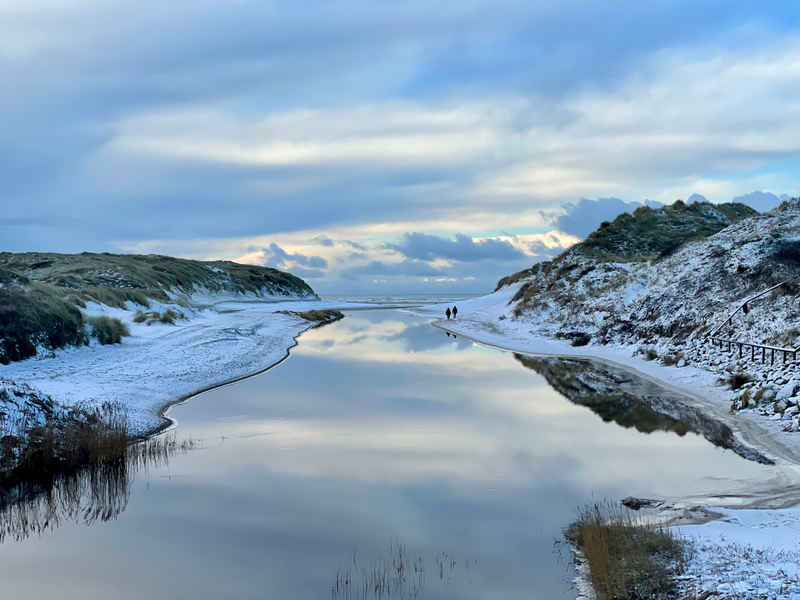
I added a Three.js post-processing stack to enhance the realism. Originally I hoped to add depth of field, but Gaussian Splats don’t write to a depth buffer, so that wasn’t possible. Instead I added a simple vignette and a bloom effect.
The bloom works well for adding to the illusion - when the sun is in view or reflecting off water, the glow feels natural. All of this is configurable in the CMS and can be turned off entirely if it doesn’t suit a particular image.

The CMS
I was intrigued by how easy Apple’s Sharp potentially made it to create Gaussian Splats, so as a challenge I wanted to make it possible for me add 3D scenes without leaving my editor. Rather than creating the splats locally with a command and then uploading to my CMS, I wanted the CMS to handle the entire process automatically.
Three Widgets
I haven’t really talked about this before, but my blog uses Decap CMS, which is quite basic, but also very extendable as it supports custom widgets. I built three:
- Generator Widget: Upload a photo, generate a 3D Gaussian Splat. One button, ~60 seconds of processing.
- Settings Widget: 30+ configuration options (camera controls, animations, post-processing) in a compact layout.
- Shortcode Component: Outputs the
<GaussianSplat />syntax for MDX posts.
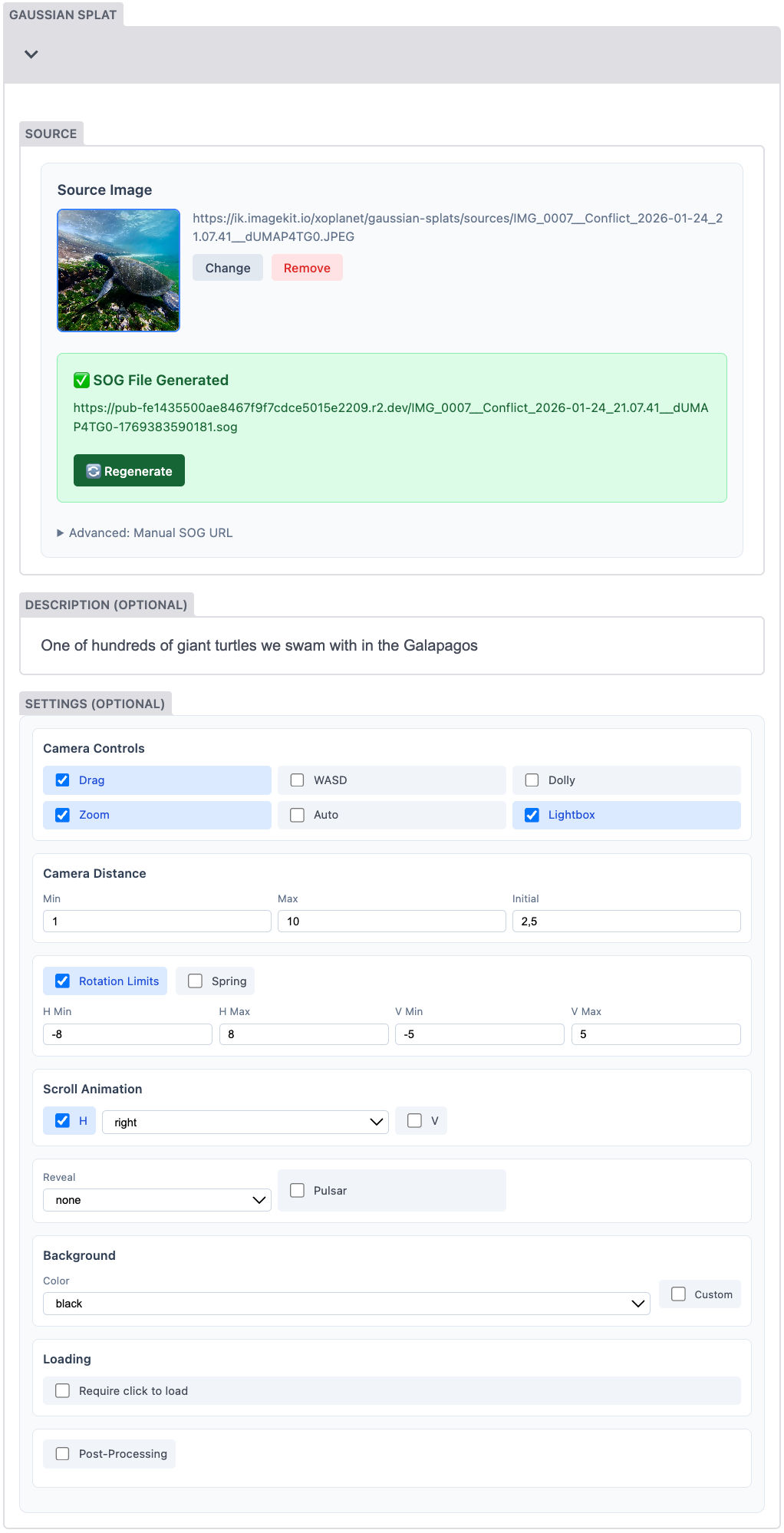
The generator was the tricky part. I use Modal.com for ML processing, which takes about 60 seconds per image. Vercel serverless functions have timeout limits that made routing through them unreliable, so the browser calls Modal directly. A progress indicator shows during processing, then the source image uploads to ImageKit while the .sog file goes to Cloudflare R2.
Why two storage services? ImageKit is excellent for images - it provides transformations, optimization, and CDN delivery. But each .sog file is ~10MB, and a page with 13 splats means 130MB of downloads per visitor. During development, I hit ImageKit’s bandwidth limits within a day. Cloudflare R2 has zero egress costs - you pay for storage and operations, but downloads are free. For large static files that don’t need transformation, that’s the right tradeoff: ImageKit for images and transformable assets, R2 for bulky binary files. Or so I think for now at least.

The Backend
Running Sharp in the Cloud
The ML runs on Modal.com, which provides GPU compute without server management. I deployed Apple’s Sharp model there - send an image, their infrastructure runs inference on an A100 GPU, generates the Gaussian Splat, compresses it to .sog, and returns it. About 60 seconds total. And it practically costs me nothing.
This required moving from GitHub Pages to Vercel - not for the ML (that’s Modal), but for ImageKit authentication tokens needed for secure uploads. I’d like to move to European hosting eventually, but Vercel was familiar and worked quickly during the holiday.
Limitations
So while I’m generally super impressed and proud to have gotten this to work, I’ve discovered a few limitations that I actually hadn’t considered (even though I’m quite used to Gaussian Splats).
Light Doesn’t Behave Right
Single-image Gaussian Splats have a limitation: light interaction doesn’t translate.
A sunset over water demonstrates this. In a multi-camera Gaussian Splat, the sun’s reflection shifts as you change viewpoints. In a single-image splat, that reflection stays glued to the water’s surface. The more you rotate, the more the illusion breaks.

Multi-camera splats interpolate between captured viewpoints, so light behavior comes from real observations. Single-image inference can’t know how light would behave from angles it never saw. The network infers depth and geometry well, but specular highlights and reflections are view-dependent - they need multiple observations.
I think this is solvable. An AI could generate synthetic viewpoints at +/- 10 degrees before running Gaussian Splat reconstruction. Those images wouldn’t be perfectly accurate, but the light interpolation would probably be enough to maintain the illusion. Feels like it’s just a few experiments away.
Some Images Just Don’t Work
Sharp struggles with certain types of images. As you can see in the splat below, technically each blade is turned into 3D, but it looks unrealistic as you rotate. The network can’t reliably guess the depth position of individual grass elements when they overlap and interweave. The result is a scene that falls apart under rotation.

This isn’t unique to grass - any scene with fine, overlapping detail at varying depths will challenge single-image inference. Dense foliage, wire fences, complex lattices. The network needs clear depth cues, and some scenes just don’t provide them. But honestly, it works more often than it don’t and that’s quite impressive.
Artifacts and Edge Boundaries
Sharp does well at creating realistic depth, especially in the middle of the frame. The challenge comes when you rotate to viewpoints that reveal previously occluded areas.
Sharp partially solves this by placing large splats behind foreground details - a kind of inferred background fill. It works surprisingly often. But some viewpoints still expose holes where the network couldn’t guess what was hidden.

A related issue: edge boundaries. Sharp can’t know what exists outside the original image frame. Rotate too far and you see the edge of the reconstructed scene - splats just stop.
I chose black for the background. White felt worse - it drew attention to the boundaries and made holes more visible. Black blends better with most scenes and feels more like looking into shadow than looking at nothing.
I’ve considered a potential fix: extending the outermost pixels with a blurred gradient that fills toward the screen edges. It wouldn’t add real information, but it might mask the hard boundaries and fill small gaps. The effect could fade naturally into the scene edges. Worth experimenting with.
Dioramas vs. Full 3D
This implementation targets diorama-style viewing. I clamp camera rotation to modest angles because single-image splats don’t look meaningful at 360 degrees - the depth inference works for nearby viewpoints, not for seeing behind the camera.
Traditional photogrammetry captures - objects scanned from all angles with dozens of photos - work differently. Those scenes invite full rotation.
I’m considering a second widget type for that use case. Much of the implementation would be shared (viewer, scroll animations, performance). But the intent differs: one widget for “I have a photo, make it explorable” (generate on the fly, constrained viewing), another for “I have a pre-captured 3D scene” (full rotation). Two workflows for two different needs.

What This Means
A year ago, generating a Gaussian Splat required video capture, expensive reconstruction, and a static scene. Now a single photo becomes an explorable 3D scene in under a minute.
Apple publishing this research openly - code, weights, documentation - made this project possible. I connected pieces: their ML model, Modal’s GPU infrastructure, ImageKit and Cloudflare R2 for storage, and a custom viewer. The techniques keep improving, compression gets better, and I wouldn’t be surprised if this kind of embedding becomes as normal as adding an image to a post. You can already see that apple is pushing it on their iOS devices… all of your images are tiltable and that also counts for devices without lidar cameras. How? Well I haven’t looked into it, but my guess is they are using Sharp already and already deployed a renderer to every users devices photo viewer.
So yeah, if you read all of this, I hope you found it inspiring. My plan is to use this format for certain kinds of blog posts. Maybe I will expand on it slightly so the 3D viewers take up more space on desktop, but otherwise I’m happy to publish this now.
Next up will be a blog about the runtime effect you might have noticed on the frontpage of this blog, which I also made over Christmas holiday. That and 2 other tools I’ve been building.